Your API, your tools, your users. Wired in.
A chatbot API and SDKs for your product
Kothadesk gives developers a chatbot API, SDKs and MCP tools. Start with one script tag. Grow into SDKs, signed user identity, tools that call your own APIs, and an admin API with scoped keys. The protocol is plain HTTPS with server-sent events, documented end to end.
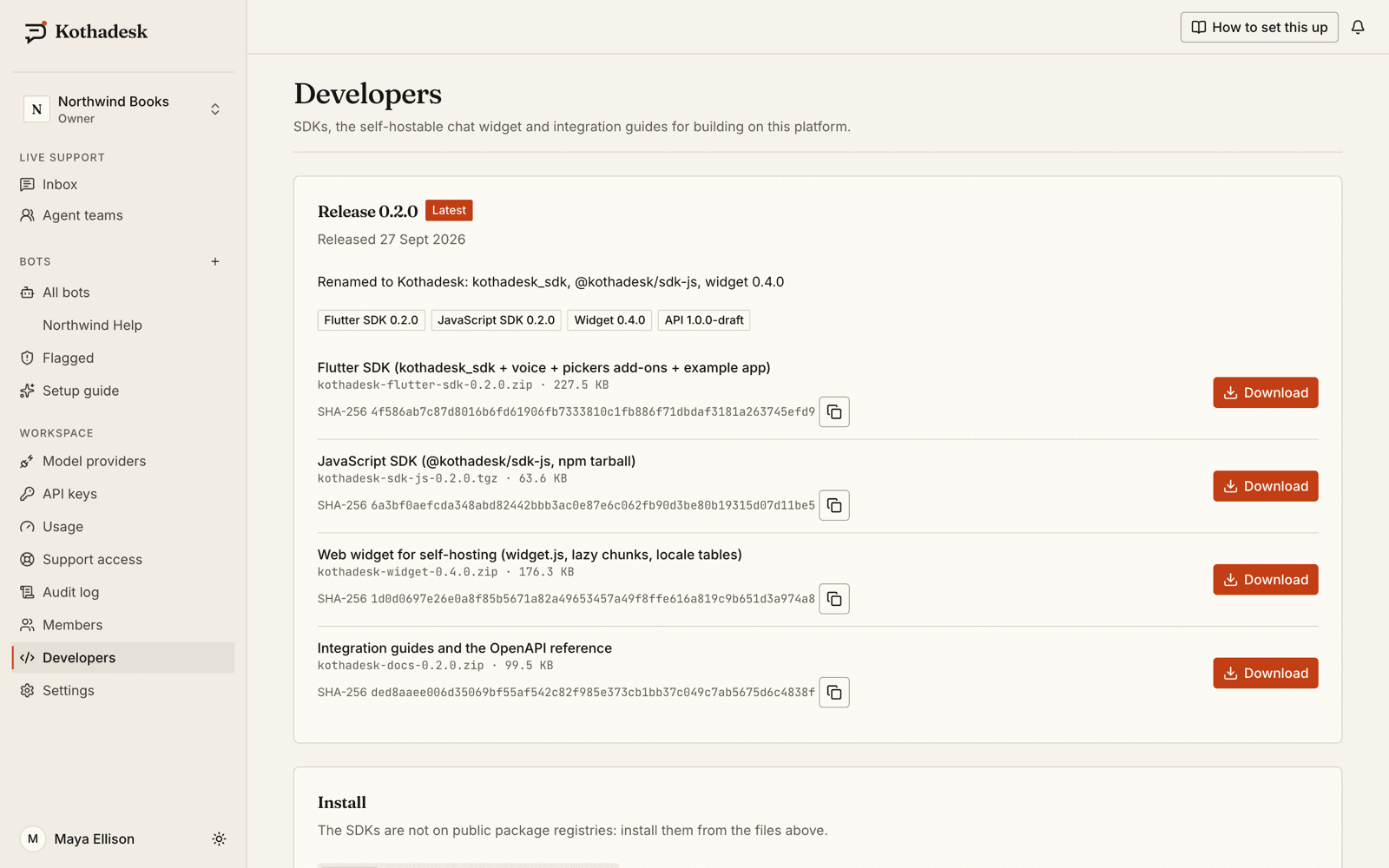
The SDKs are downloaded from the Developers page of your dashboard, not from npm or pub.dev.
<script
  src="https://cdn.kothadesk.com/widget/v1/widget.js"
  data-bot-id="bot_01J9ZKQ3M4X8R2T6V0B1C5D7EF"
  data-api-url="https://api.kothadesk.com"
  async></script>
01
Chatbot API quickstart: three ways in.
Web widget
Paste the script tag before </body>. Allow your site's origin on the bot's Install tab. That is the whole integration.
Install the chatJavaScript SDK
Build your own chat UI on a typed client that streams tokens, citations and images, resumes dropped streams and renews sessions.
SDKs in the install guideFlutter SDK
A headless client plus a drop-in chat screen and launcher for iOS and Android, with optional file and voice add-ons.
Add it to your app
index.html
<script
  src="https://cdn.kothadesk.com/widget/v1/widget.js"
  data-bot-id="bot_01J9ZKQ3M4X8R2T6V0B1C5D7EF"
  data-api-url="https://api.kothadesk.com"
async></script>02
Where Kothadesk sits.
The widget and SDKs talk to one API. Anything that leaves Kothadesk for your systems goes through an egress proxy with an SSRF guard, timeouts and response limits.
03
Tell it who is signed in.
Your server signs a short-lived HS256 token with the workspace identity secret. The browser only carries it; Kothadesk verifies it.
server/identity.js
// On your server, never in the browser.
import jwt from "jsonwebtoken";

export function chatIdentityToken(user) {
  return jwt.sign(
    {
      sub: user.id,
      name: user.name,
      email: user.email,
      aud: "bot_01J9ZKQ3M4X8R2T6V0B1C5D7EF",
      ctx: { plan: user.plan },
    },
    process.env.KOTHADESK_IDENTITY_SECRET,
    { algorithm: "HS256", expiresIn: "10m" },
  );
}| Claim | Required | Notes |
|---|---|---|
| sub | Yes | Your stable user id |
| exp | Yes | At most 10 minutes after issue |
| aud | Recommended | The bot id, so a token works for one bot only |
| name, email | No | Shown to agents; email is used for transcripts |
| ctx | No | Up to 4 KB of trusted facts, such as the user's plan |
04
REST and MCP tools that call your systems.
Describe a REST endpoint or connect a remote MCP server. The assistant decides when to call it; you decide what it may do.
{
  "name": "get_order_status",
  "display_name": "Checking your order",
  "description": "Look up the status of one of the signed-in customer's orders.",
  "input_schema": {
    "type": "object",
    "properties": { "order_id": { "type": "string", "pattern": "^[0-9]{1,10}$" } },
    "required": ["order_id"],
    "additionalProperties": false
  },
  "method": "GET",
  "url": "https://shop.example.com/api/customers/{{end_user.sub}}/orders/{{args.order_id}}",
  "auth": { "type": "bearer", "secret": "write-only" },
  "side_effect": "read",
  "requires_identity": true
}- Reads run, writes ask
- Write tools need the visitor's confirmation in the chat unless you allow automatic runs.
- Identity-scoped calls
- Tools marked for signed-in users receive that user's id and context, never anyone else's.
- Secrets stay server-side
- API key, bearer, basic or OAuth2 client credentials, encrypted and never returned.
- MCP over Streamable HTTP
- Tools are discovered from the server; you enable them one by one.
05
Admin API and server-to-server chat.
Secret keys with scopes let your backend manage bots, knowledge and conversations, or chat with a bot from your own server.
| Key | Where it lives | What it can do |
|---|---|---|
| sk_live_... | Your server only | Scoped admin actions and server-to-server chat |
| pk_live_... | Inside your app | Selects the bot for a mobile channel; not a secret |
| Identity secret | Your server only | Signs user identity tokens |
06
Security notes for your review.
What your security team will ask about, answered up front.
- Origin allowlist
- The web widget only works on the origins you list for the bot.
- Tokens out of URLs
- Replies stream over fetch, not EventSource, so session tokens never appear in a URL.
- 404, not 403
- Another tenant's resources answer not found, so ids reveal nothing.
script-src https://cdn.kothadesk.com;
connect-src https://api.kothadesk.com https://cdn.kothadesk.com;
img-src https://api.kothadesk.com https://cdn.kothadesk.com data:;
07
The SDK kit, in your dashboard.
Every member of a workspace can download the Flutter SDK, the JavaScript SDK, a self-hostable widget build and the integration guides, each with a checksum. The SDKs are not published on npm or pub.dev.
| Package | Version | For |
|---|---|---|
@kothadesk/sdk-js | 0.4.0 | JavaScript and TypeScript: browsers, Node, Deno, Bun |
kothadesk_sdk | 0.4.0 | Flutter: iOS and Android, with file and voice add-ons |
Web widget | 0.6.0 | The one-tag widget, also as a self-hostable build |
08
Related guides.
Step-by-step setup, with worked examples by business.
Read the guides, then ship it.
Create a free workspace to get your bot id, keys and the full SDK kit.