Knowledge, answers, handoff, review. One loop.
The AI support chatbot platform, feature by feature
Kothadesk is one customer support system rather than four tools: what the chatbot knows, how it answers, when it steps aside for a person on live chat, and what you learn from the conversations it could not finish. It all runs on your own AI key.
01
Knowledge sources you already have.
Point the chatbot at your help centre, upload the documents that matter and keep an FAQ table for the answers you want word for word. Each source belongs to one bot.
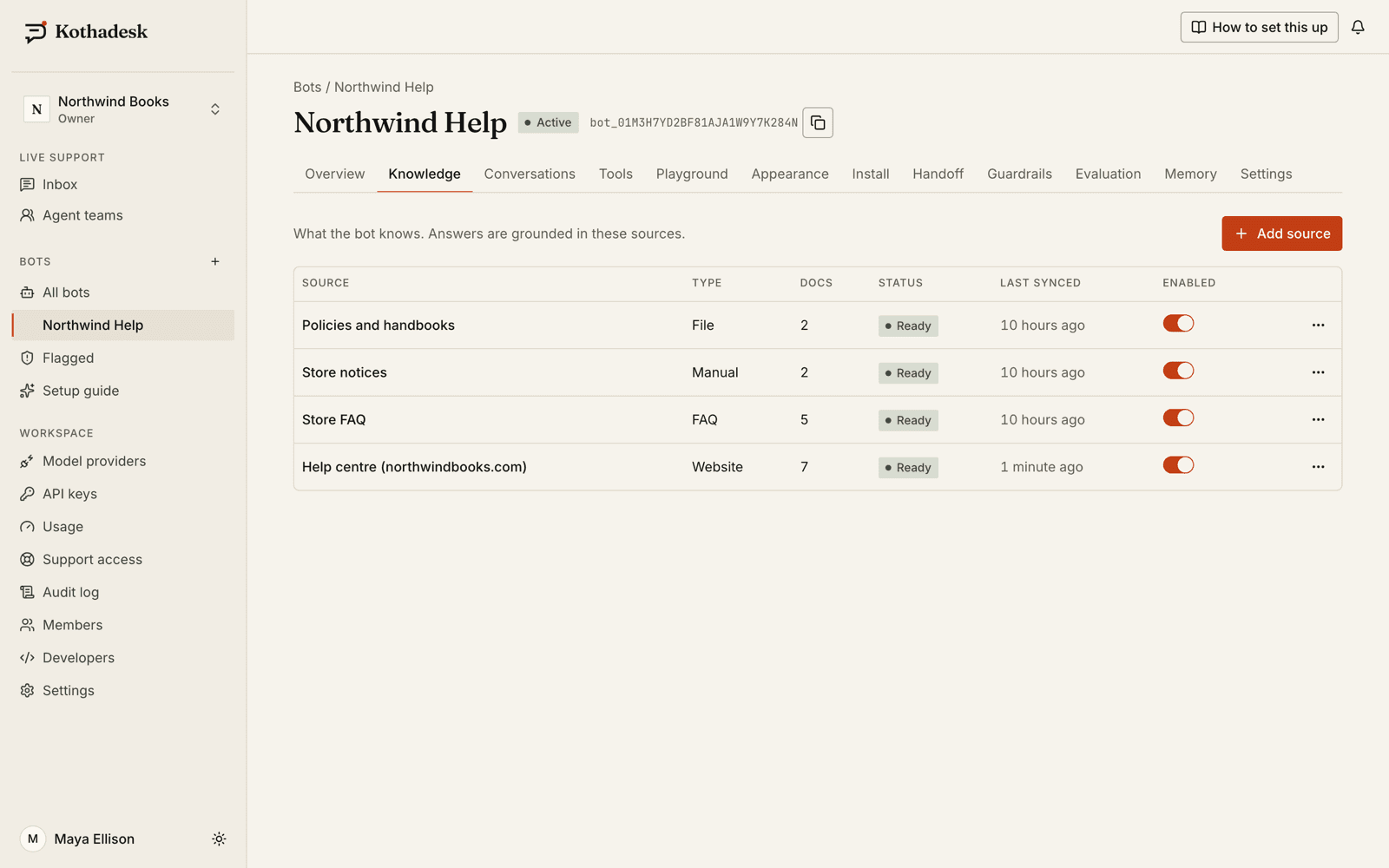
- Crawl a website of up to 5,000 pages per source, including sites that only show content after JavaScript runs. Sitemaps are found and used automatically, and robots.txt is respected.
- Upload PDF, DOCX, Markdown, text, CSV or HTML files up to 25 MB each.
- Edit FAQ entries inline or import them from CSV; write longer answers as Markdown text.
- Upload product photos, floor plans or diagrams as an Images source, each with a title and description.
- Re-crawl on demand, daily or weekly. Content that has not changed is not embedded again, so re-syncs cost almost nothing on your key.
02
Cited answers, with images when they help.
Every answer cites the passages it used. No source, no claim. When your content does not cover a question, the chatbot says so instead of guessing.
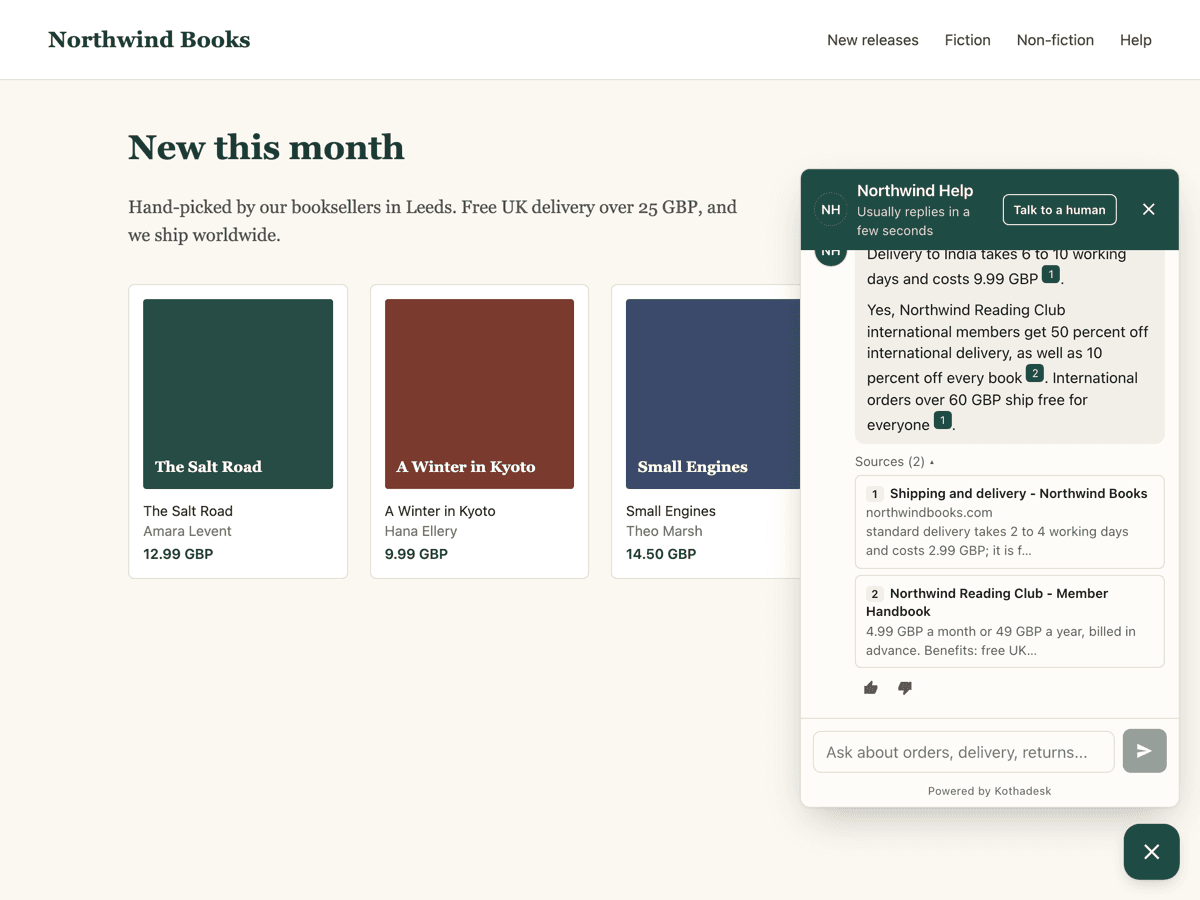
- Search combines meaning and exact words, with relevance thresholds calibrated per bot so unrelated passages are dropped.
- Citations are numbered by first use; you decide whether visitors see inline numbers, a source list or neither.
- Images from your pages, PDFs, Word files and uploads appear right after the sentence they illustrate, up to three per answer.
- Images without alt text can be described by your own vision-capable model, so they can be found by the words a visitor uses.
- Replies follow the language and script of the visitor's latest message, including romanized Hindi.
03
On the AI model you choose.
Kothadesk does not resell model usage. Each bot runs on your own provider key, and your provider bills you at its list price.
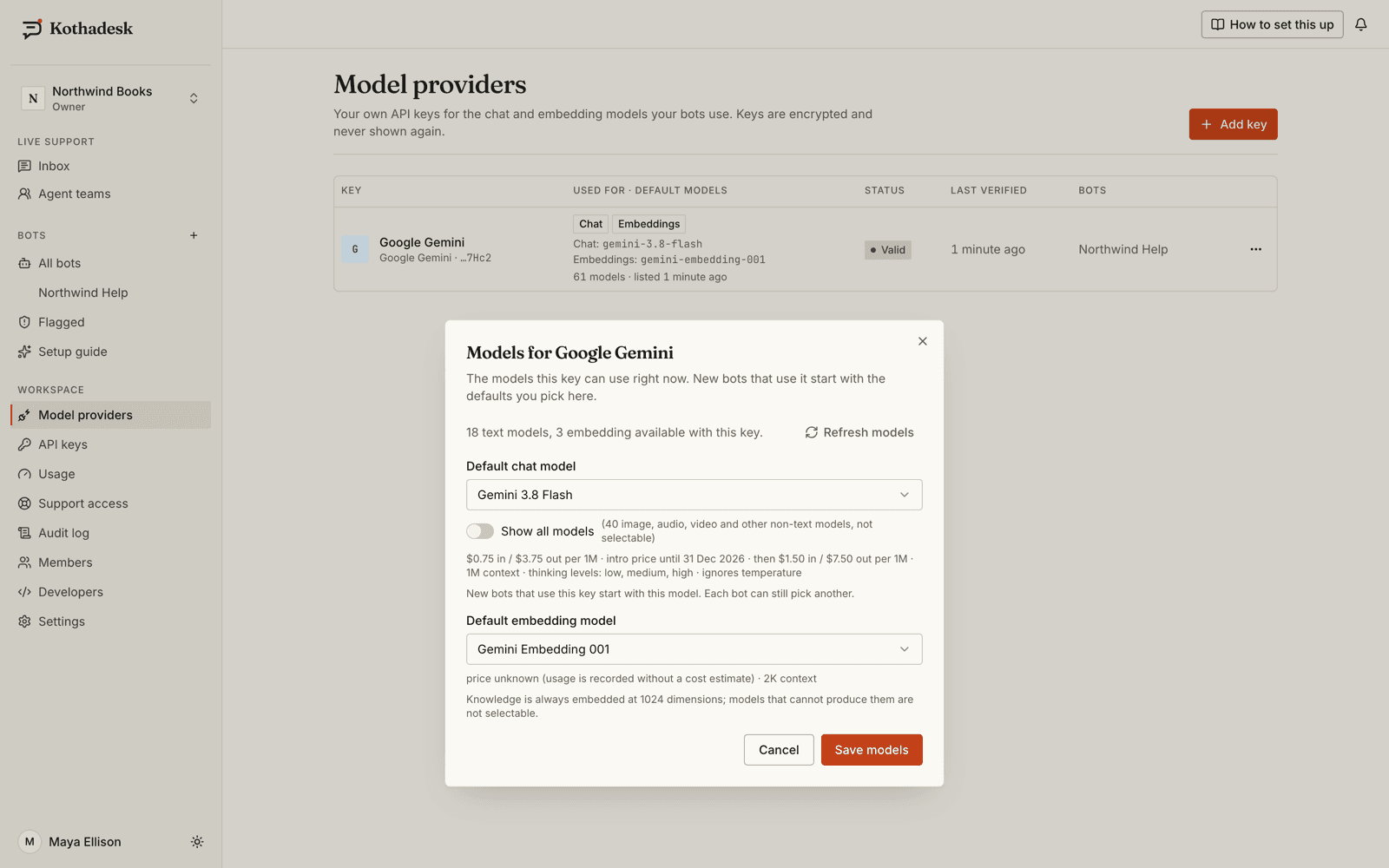
- OpenAI, Anthropic, Google Gemini, xAI Grok or any OpenAI-compatible endpoint over HTTPS.
- Choose the chat and embedding models per bot from the live list your key can access.
- Keys are verified on save, encrypted per workspace and never shown again.
04
Guardrails for what it says and promises.
Safety checks run before and after the model on every message. Business rules you set decide what the chatbot talks about and what it may promise.
- Always on
- Checks for jailbreaks, prompt extraction, impersonation, abuse and spam, and a caring reply with crisis-line guidance for anyone at risk.
- Promises checked
- Refunds, prices, dates and guarantees must match your cited content, native digits included, or the answer is replaced.
- Topics and competitors
- Blocked topics get a polite fixed decline with no model call; answers stay neutral about competitors you list.
- In the visitor's language
- Fixed replies from the guardrails are written in 30 languages. Cloudflare Turnstile can stop scripted chats.
05
Tools that act in your systems.
Describe a REST endpoint or connect a remote MCP server, and the chatbot can look up an order, list free appointment slots or create a ticket.
- Read tools run on their own; write tools ask the visitor to confirm in the chat unless you allow automatic runs.
- Tools marked for signed-in users receive that user's id and context from a token your server signs, never from the browser.
- Credentials are encrypted and never returned: API key, bearer, basic or OAuth2 client credentials.
- Every tool call is logged with the conversation, and you can test a tool before the chatbot relies on it.
06
Memory and identified visitors.
When your site signs in a user, the chatbot knows who is asking. With memory on, it also remembers what they told it last time.
- Signed identity: a short-lived token from your server carries the user's id, name, email and trusted context such as their plan.
- Opt-in memory per bot, off by default, for signed-in users only: short, encrypted facts and preferences with their own retention.
- Users can ask the chatbot to forget what it remembered, and agents see what it remembers in the inbox.
07
Live chat handoff and AI assist for agents.
A person, when a person is better. The same widget turns into a live chat with your team, with files, and a voice call on eligible plans.
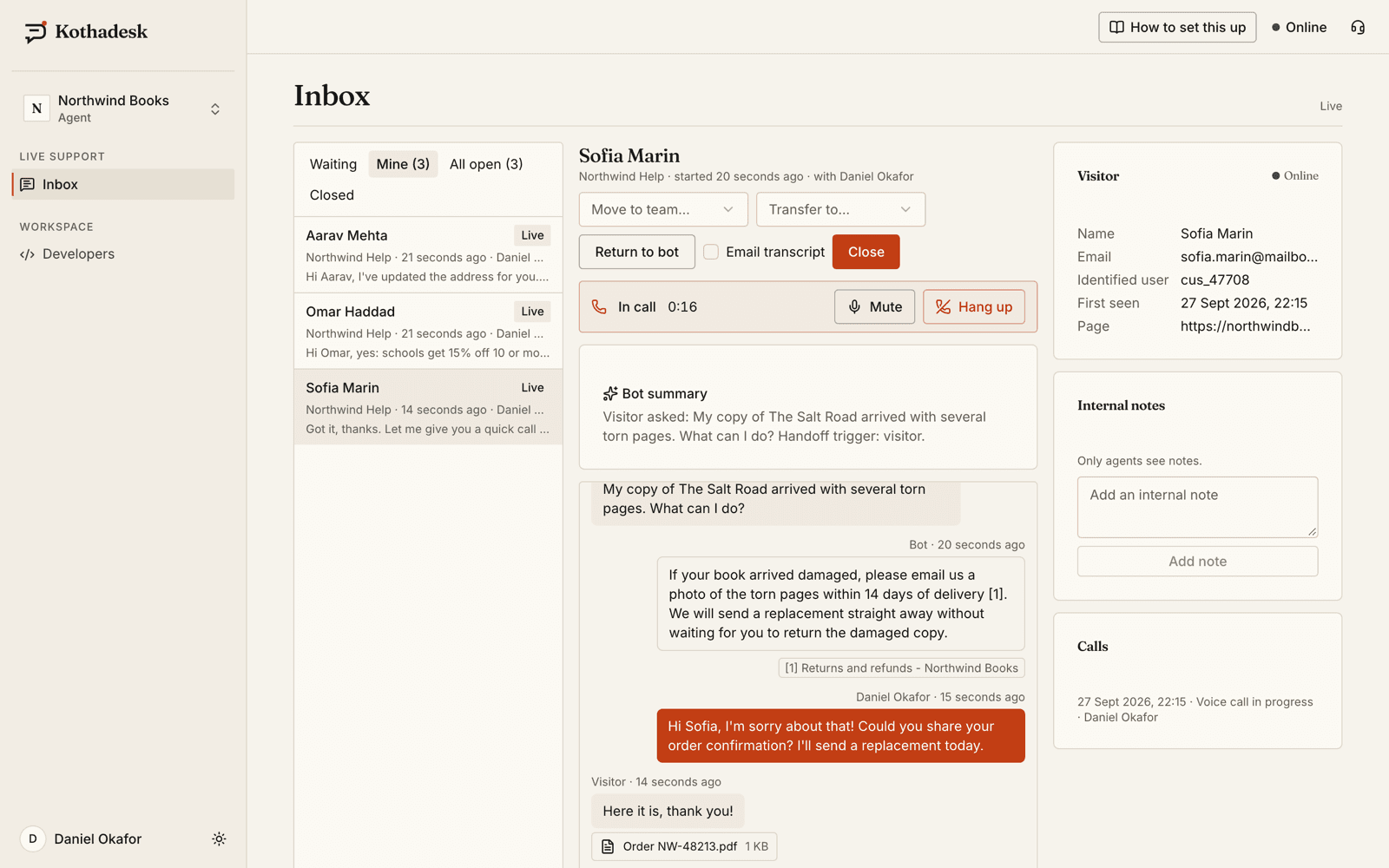
- Handoff when the visitor asks, or accepts an offer after unanswered questions, a thumbs-down or one of your keywords.
- Teams with routing rules by language, intent, cited source or signed-in user; queue position for visitors and capacity limits for agents.
- An inbox built for busy agents: waits sorted by urgency, search, canned responses, internal notes and keyboard shortcuts.
- AI assist on eligible plans: a suggested reply from your knowledge in the visitor's language, Ask AI for a private answer, and translation.
- Offline form outside business hours; the message becomes a ticket and your agents are emailed.
08
Evaluation sets and unanswered-question review.
Unanswered questions and thumbs-down feedback are filters, not buried logs. Evaluation sets let you test a model or setting change before visitors see it.
- Filter conversations by unanswered, feedback and signed-in users; review guardrail flags in their own list.
- Test questions in the Playground and see the retrieved passages, their scores and the bot's thresholds.
- Build evaluation sets from real questions, generate cases from your sources or import JSONL, then compare two runs side by side. The judge runs on your own key too.
- Usage page with token counts and estimated provider cost per bot, model and day, exportable as CSV.
09
Channels: widget, hosted page and SDKs.
The same chatbot, the same knowledge and the same live support, wherever your customers are. Messaging apps such as WhatsApp are not supported yet.
| Channel | What it is |
|---|---|
| Web chat widget | One script tag; under a 60 KB gzip budget, ten interface languages, right to left |
| Hosted chat page | A full-page chat at your own short link, with a QR code |
| JavaScript SDK | A typed client for your own chat interface, in browsers and Node |
| Flutter SDK | A drop-in chat screen for iOS and Android, with file and voice add-ons |
10
On every plan.
Plans differ in volume and team features. These are always included.
| Capability | What it means |
|---|---|
| Your own model key | Five provider types; no markup on model usage |
| Cited answers | Grounded in your sources, with an honest fallback |
| Web widget and hosted page | Under the 60 KB budget, ten interface languages |
| Guardrails | Input and output checks, fixed replies in 30 languages |
| Privacy tooling | Visitor export and erasure, retention controls, audit log |
11
Questions about the platform.
What does the Kothadesk chatbot platform include?
Knowledge sources, cited answers with images, guardrails, tools that call your APIs, opt-in memory for signed-in users, live chat with your team, AI assist for agents on eligible plans, evaluation sets, and a widget, hosted page and SDKs to put it all in front of customers.
Do I need to write code?
No for the basics: add a key, add your website or files in the dashboard, and paste one script tag. Code is only needed for signed-in users, your own chat interface or tools that call your systems.
Which AI models does it use?
Yours. Each bot runs on a chat model and an embedding model from your own OpenAI, Anthropic, Gemini, xAI or OpenAI-compatible key, chosen from the live list your key can access.
Can it hand a chat to a person?
Yes. Live chat is built in: the visitor asks for a person or accepts an offer, and the chat is routed to a team in the same window with the full transcript. Voice calls are available on eligible plans.
How do I know the answers are good?
Every answer lists its sources, unanswered questions and negative feedback are filters in Conversations, and evaluation sets score retrieval and faithfulness so you can compare two settings before visitors see a change.
12
Related guides.
Step-by-step setup, with worked examples by business.
Put your own model to work on your support.
Start on the free plan with your own AI key. No card needed.