Small enough for your page speed. Strict enough for your security team.
An AI chat widget you add with one script tag
One script tag adds the AI chatbot to any website, with live chat to your team built in. It stays inside a hard size budget, keeps its styles to itself, speaks ten interface languages and works under a strict Content Security Policy. The same chatbot runs on a hosted page and inside your apps.
01
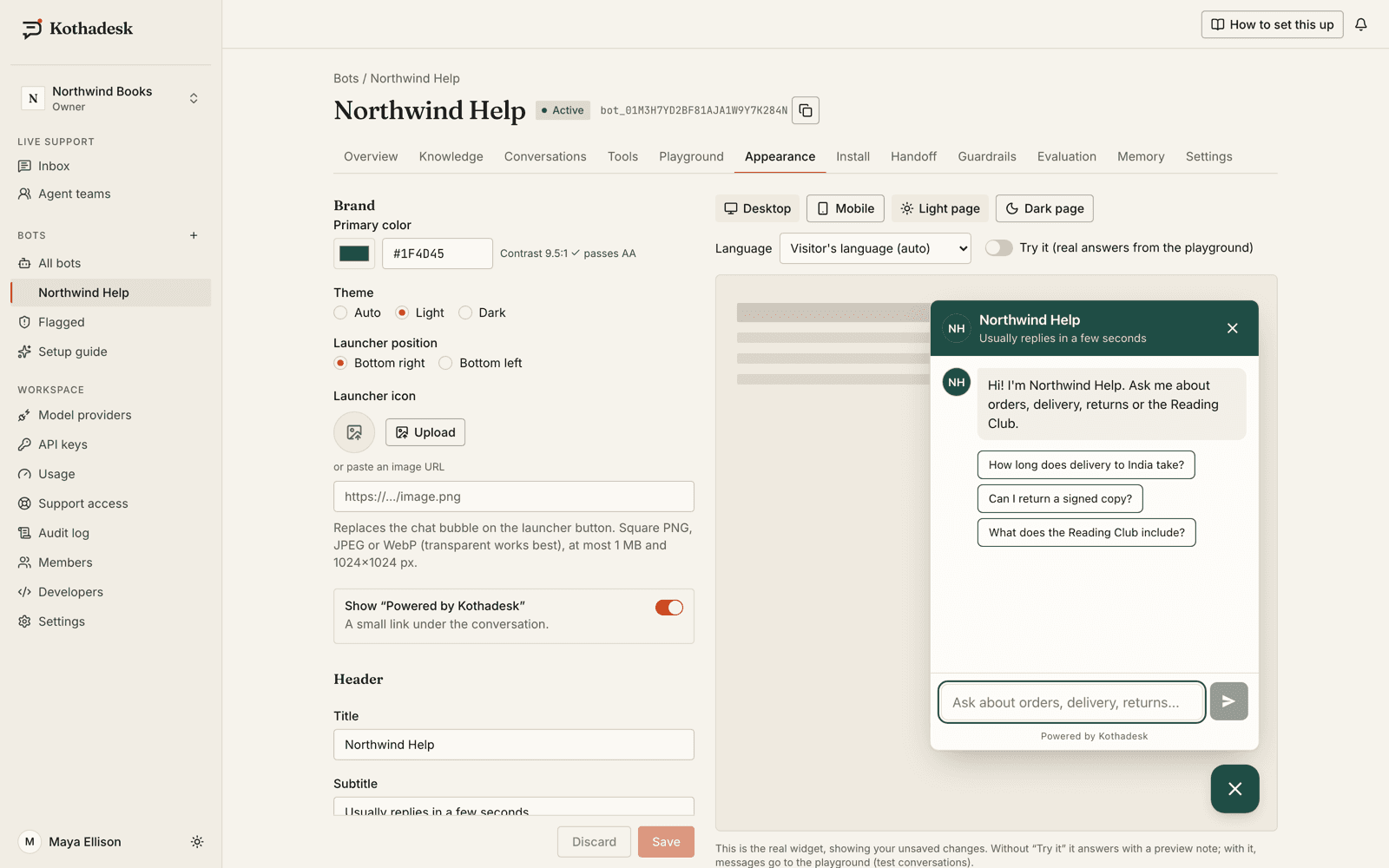
The chat widget in numbers.
| Detail | |
|---|---|
| Size | 60 KB gzip hard limit, checked on every build; languages and voice load on demand |
| Isolation | Shadow DOM, so your CSS and ours never collide |
| Interface languages | English, Hindi, Hinglish, Bengali, Assamese, Spanish, Arabic, French, German, Portuguese |
| Right to left | Arabic lays the whole widget out right to left |
| Appearance | Primary colour, light or dark theme, side of the page, title, welcome copy and suggested questions |
| Your wording | Override the chatbot's and live-support copy in each language |
| Preview | The real widget in a sandboxed preview while you edit |
02
Install once, under your own policy.
Allow our CDN and API in your Content Security Policy and nothing else. The install page generates the exact snippet and policy for your bot, including what voice calls and attachments need.
<script
  src="https://cdn.kothadesk.com/widget/v1/widget.js"
  data-bot-id="bot_01J9ZKQ3M4X8R2T6V0B1C5D7EF"
  data-api-url="https://api.kothadesk.com"
async></script>script-src https://cdn.kothadesk.com;
connect-src https://api.kothadesk.com https://cdn.kothadesk.com;
img-src https://api.kothadesk.com https://cdn.kothadesk.com data:;03
Install on WordPress, Shopify, Webflow or Next.js.
There is no plugin to install and none is needed. Any platform that lets you add custom code to your pages can run the widget. Copy your bot's tag from its Install tab, then:
| Platform | Where the tag goes |
|---|---|
| WordPress | Your theme's footer, before </body>, or any plugin that inserts header and footer code |
| Shopify | Online Store, Themes, Edit code: theme.liquid, just before </body> |
| Webflow | Site settings, Custom code, Footer code; then publish the site |
| Next.js | The root layout, with next/script as below |
| Any other site | Before </body> on every page, or in your tag manager |
Then add your site's address to the bot's allowed origins: the widget only runs on the origins you list.
// app/layout.tsx
import Script from "next/script";

export default function RootLayout({ children }) {
  return (
    <html lang="en">
      <body>
        {children}
        <Script
          src="https://cdn.kothadesk.com/widget/v1/widget.js"
          data-bot-id="bot_01J9ZKQ3M4X8R2T6V0B1C5D7EF"
          data-api-url="https://api.kothadesk.com"
          strategy="lazyOnload"
        />
      </body>
    </html>
  );
}
04
Customise the chat widget.
Every change shows in a live preview of the real widget before you save.
- Look
- Primary colour, light or dark theme, side of the page, header title, your avatar and your own launcher icon.
- First words
- Welcome message and up to six suggested questions, such as Where is my order? or Book an appointment.
- Your wording, per language
- Override the chatbot's and live-support copy in each of the ten interface languages, or fix the bot to one.
- Branding
- The Powered by Kothadesk link can be removed on eligible plans.
05
No website? A hosted chat page.
Turn on a full-page chatbot at your own short link, share it or print its QR code. It is hidden from search engines unless you allow indexing.
- Your slug
- A readable address for the page, with your bot's name and branding.
- Language by link
- Add a locale to the link to open the page in a specific language.
06
Inside your iOS and Android apps.
The Flutter SDK brings the same AI chatbot as a drop-in chat screen with live support, and optional add-ons for file pickers and voice calls, so apps that do not need them do not ship their native code.
final client = KothadeskClient(
  botId: 'bot_01J9ZKQ3M4X8R2T6V0B1C5D7EF',
  apiUrl: 'https://api.kothadesk.com',
  publishableKey: 'pk_live_...',
  storage: SharedPreferencesStorage(),
);
final chat = KothadeskController(client);

// A drop-in chat screen...
Navigator.of(context).push(
  MaterialPageRoute(builder: (_) => KothadeskView(controller: chat)),
);
// ...or a floating button with an unread badge.
Stack(children: [myScreen, KothadeskLauncher(controller: chat)]);- JavaScript SDK
- A typed client of about 5.5 KB (minified and gzipped) for your own chat UI, in browsers, Node, Deno or Bun.
- Publishable keys for apps
- Apps select the bot with a publishable key; rate limits, abuse protection and signed identity protect it.
07
Questions about the chat widget.
Does the chat widget affect page speed?
Very little. The widget has a hard 60 KB gzip budget enforced in our build, loads asynchronously so it never blocks your page from rendering, and fetches language tables and the voice code only when they are needed.
Does it work with a strict Content Security Policy?
Yes. Allow the widget's CDN in script-src and the API in connect-src. The install page generates the exact policy for your bot.
Is there a WordPress or Shopify plugin?
No native plugin today, and none is needed: the widget is one script tag, so any platform that lets you add custom code to your pages can run it, including WordPress, Shopify, Webflow and Next.js.
Are the mobile SDKs on pub.dev or npm?
Not yet. Signed-in customers download the Flutter SDK, the JavaScript SDK and a self-hostable widget build from the Developers page in the dashboard.
09
Related guides.
Step-by-step setup, with worked examples by business.
One script tag. Then back to your day.
Start on the free plan with your own AI key. No card needed.