Your key. Your provider. No token meter in between.
Bring your own OpenAI, Claude, Gemini or Grok key to your support chatbot
Kothadesk is a BYOK chatbot: add an API key from the AI provider you already trust. Kothadesk encrypts it, checks it, and uses it only for your workspace. Your provider bills you for what your assistant actually uses, at their price, and you can change models whenever you like.
01
How a BYOK chatbot works, in four steps.
- 01
Add a key
Paste an API key and give it a label. Owners and admins can add, rotate and remove keys; every change is audited. - 02
Kothadesk verifies it
A cheap list-models call, plus one test embedding for keys used for search. A key that fails is never saved as valid. - 03
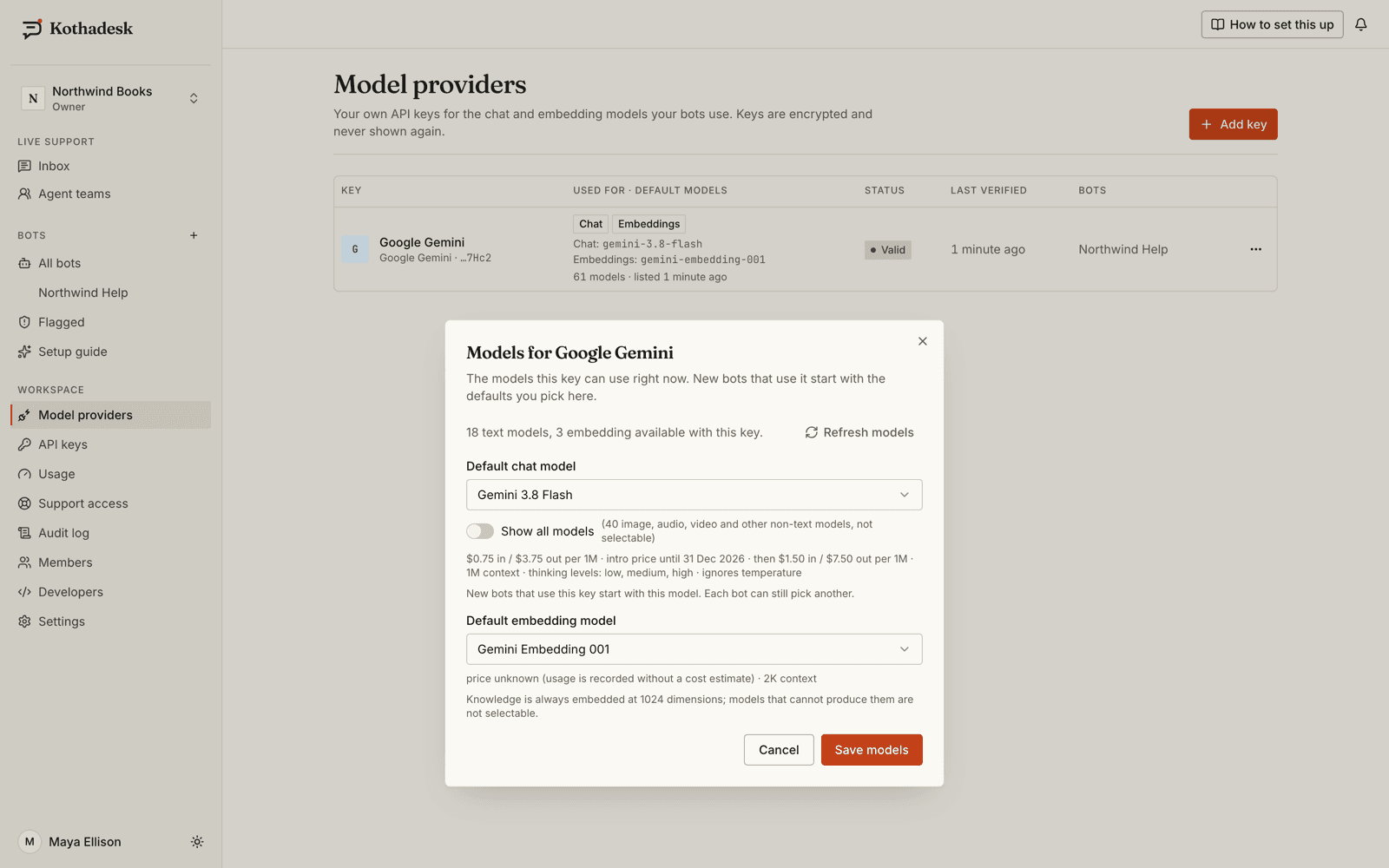
Pick default models from the live list
The models come from your provider, fetched with your key, with prices and status where we know them. Nothing is hard-coded. - 04
Each bot chooses its own
A bot uses one chat key and model and one embedding key and model. Two bots can run on two different providers.
02
Five kinds of provider.
Search uses 1024-dimension embeddings, so every workspace needs at least one key that can produce them. Each bot then uses one chat key and one embedding key.
| Provider | Chat | Embeddings | Notes |
|---|---|---|---|
| OpenAI | Yes | Yes | One key can cover both |
| Anthropic | Yes | No | Add a second key for embeddings |
| Google Gemini | Yes | Yes | Free-tier keys work for testing |
| xAI Grok | Yes | When 1024 dimensions are supported | OpenAI-compatible API |
| OpenAI-compatible | Yes | Yes | Your HTTPS base URL: OpenRouter, vLLM, Ollama, gateways |
03
Notes for each provider.
Models come from your provider's live list, fetched with your key. Nothing is hard-coded, so new models appear when your provider releases them.
- OpenAI
- One key covers chat and embeddings. You can also send each visitor message to your key's moderation endpoint.
- Anthropic (Claude)
- Claude writes the answers. Anthropic has no embedding models, so an Anthropic-only workspace adds a second key from OpenAI, Gemini or a compatible provider for search.
- Google Gemini
- A Google AI Studio key covers both. A free-tier key works for testing; move to a paid key before going live.
- xAI (Grok)
- Chat through xAI's OpenAI-compatible API; embeddings when a model supports 1024 dimensions, otherwise add a second key.
- OpenAI-compatible
- OpenRouter, vLLM, Ollama or your own gateway on a public HTTPS address. Private addresses are refused, and costs are not estimated.
- Models by preset or by name
- Pick a preset for lowest cost, a balance of quality and cost, or best quality, which follows the recommended model; or name any model your key can use.
04
BYOK versus per-resolution pricing.
Many AI support tools bundle model usage into their price, per resolution or per credit. Kothadesk separates the two bills.
| Per-resolution or credit plans | Kothadesk (BYOK) | |
|---|---|---|
| Who bills model usage | The vendor, bundled into its price | Your provider, directly |
| Price per answer | Set by the vendor, with a margin | Your provider's list price |
| Model choice | The vendor's pick | Any model your key can use, per bot |
| What Kothadesk charges | Not applicable | A flat platform plan, free to start |
| Seeing the cost | An invoice line | Tokens and estimated cost per bot, model and day |
The trade-off: you hold an account with an AI provider and watch its limits. In return your AI cost stays at list price, visible, and yours to change.
05
Where your key goes, and where it does not.
Requests leave Kothadesk for your provider only. Retries and fallbacks use your own keys, never another customer's and never a platform key.
06
How keys are kept.
- Envelope encryption
- Each key is encrypted with a data key that belongs to your workspace alone.
- Write-only
- After saving, a key is never returned, logged, traced or sent to a browser. You see the last four characters.
- Private endpoints refused
- Custom base URLs must be HTTPS, pass the SSRF guard and go out through the egress proxy.
- Usage you can see
- Token counts and an estimated cost per bot, model and day, exportable as CSV. Unknown models show tokens with no price.
07
When a key stops working.
08
Switch models without guessing.
Before you change a bot's model, run your evaluation set with the new setting and compare the two runs side by side.
- Evaluation sets from real questions
- Add questions from real conversations, generate cases from your sources, or import JSONL. The judge runs on your own key too.
- Re-indexing in the background
- Changing the embedding model re-embeds the bot's sources while the old index keeps answering.
09
Questions about bringing your own key.
Why should I bring my own key instead of paying for usage?
Because it keeps your AI cost visible and at list price, lets you choose and change models freely, and keeps the contract for model usage between you and your provider.
Can I use a free-tier key to try it?
Yes, for example a free-tier Gemini key works for testing. Free tiers have low rate limits, so move to a paid key before going live.
What happens if my key stops working?
Owners and admins get an in-app notification and an email when a key becomes invalid or hits a quota. Visitors see a neutral unavailable notice, never a provider error.
Can different bots use different providers?
Yes. Each bot picks a chat credential and model, and an embedding credential and model, from the keys in your workspace.
11
Related guides.
Step-by-step setup, with worked examples by business.
Bring the key you already have.
Start on the free plan with your own AI key. No card needed.