Answers from your docs, with receipts.
Train an AI chatbot on your website and docs
Kothadesk reads what you already publish, your website, help centre, PDFs, Word files and FAQs, and your customer support chatbot answers from it, numbering each source it relies on. When your documents do not cover a question, it says so and offers a person instead of improvising.
01
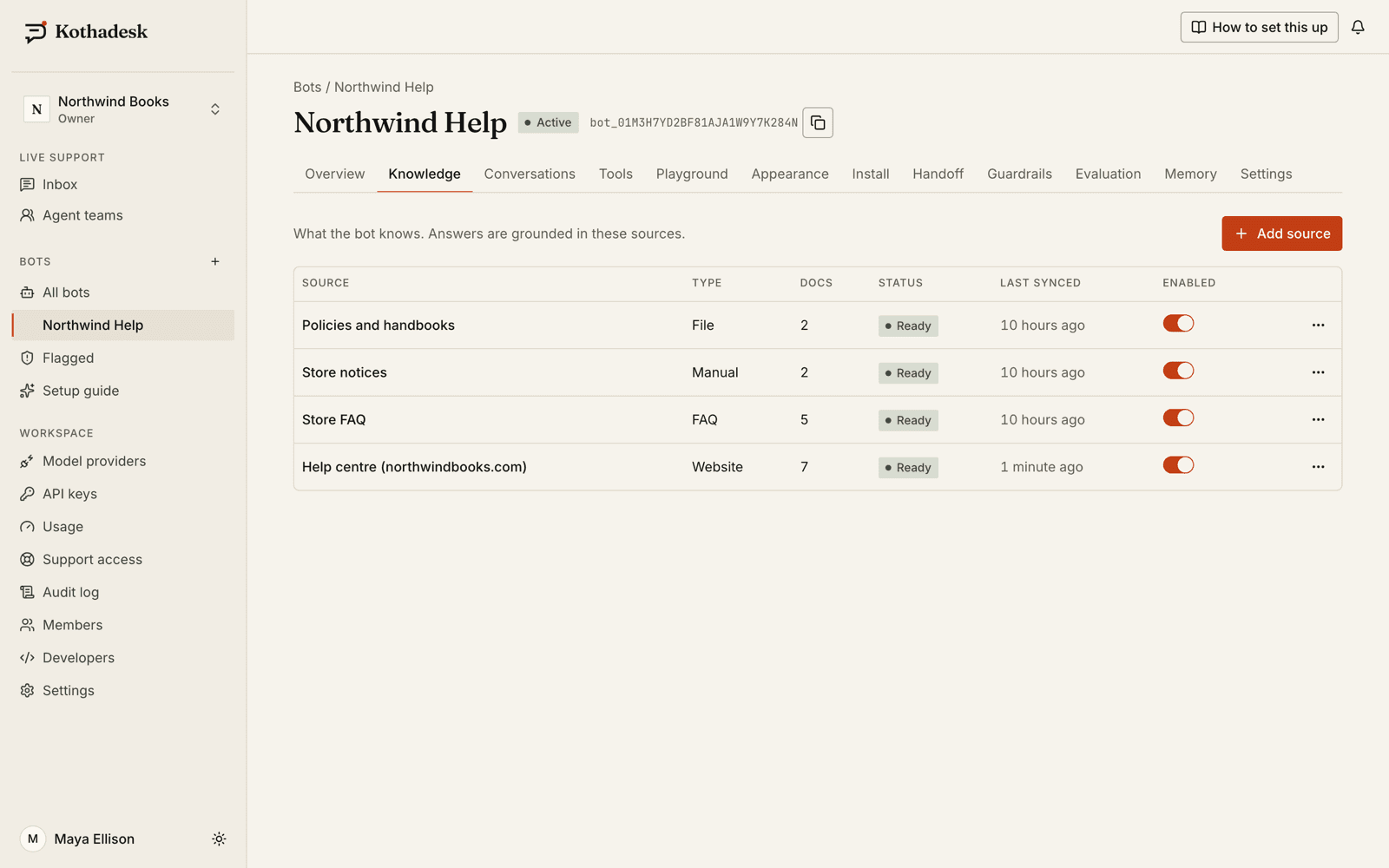
Supported knowledge sources.
Train the chatbot on the content you already have. Each source belongs to one bot, and indexing runs in the background on your own embedding key.
| Source | What you provide | Details |
|---|---|---|
| Website | A start URL | Up to 5,000 pages per source; whole site, one path or one page; linked PDFs included |
| JavaScript-rendered sites | The same start URL | Pages that only show content after scripts run are rendered first; Automatic, Never or Always |
| Sitemap | A sitemap URL | Sitemap indexes and gzip supported; found automatically |
| PDF and DOCX | Files up to 25 MB | Headings kept for citations; 20 files per upload |
| CSV, TXT and HTML | Files up to 25 MB | Price lists, timetables, exported pages |
| FAQ table | Question and answer pairs | Edit inline or import up to 500 rows of CSV; an entry may cite a page |
| Markdown | Files, or text you write | Up to 200,000 characters, with a safe preview |
| Images | Photos with a title and description | JPEG, PNG, WebP, GIF or HEIC |
The crawler respects robots.txt, skips pages marked noindex and identifies itself as KothadeskBot. Pages behind a login cannot be crawled; upload them as files instead. Scanned PDFs without a text layer are not read yet.
02
How the chatbot builds an answer (RAG).
Retrieval-augmented generation, step by step: the model writes the reply, but only from passages Kothadesk found in your content.
- 01
Add a source
A website, a sitemap, files, an FAQ table or a Markdown page. Each source belongs to one bot. - 02
Kothadesk splits and indexes it
Documents are cut at their headings into passages of about 400 tokens and embedded with your own embedding key. Unchanged content is not embedded twice. - 03
The question is understood first
One short call works out the language, the intent and a standalone version of follow-up questions, while the search runs in parallel. - 04
Search combines meaning and words
Vector and keyword search together, with relevance thresholds calibrated per bot so unrelated passages are dropped instead of quoted. - 05
The answer cites what it used
Sources are numbered in the order the answer uses them, and only sources the answer still relies on after every check are listed.
03
Citations that mean something.
A number appears only where a fact came from your sources. Greetings, small talk and questions about the assistant itself are never cited.
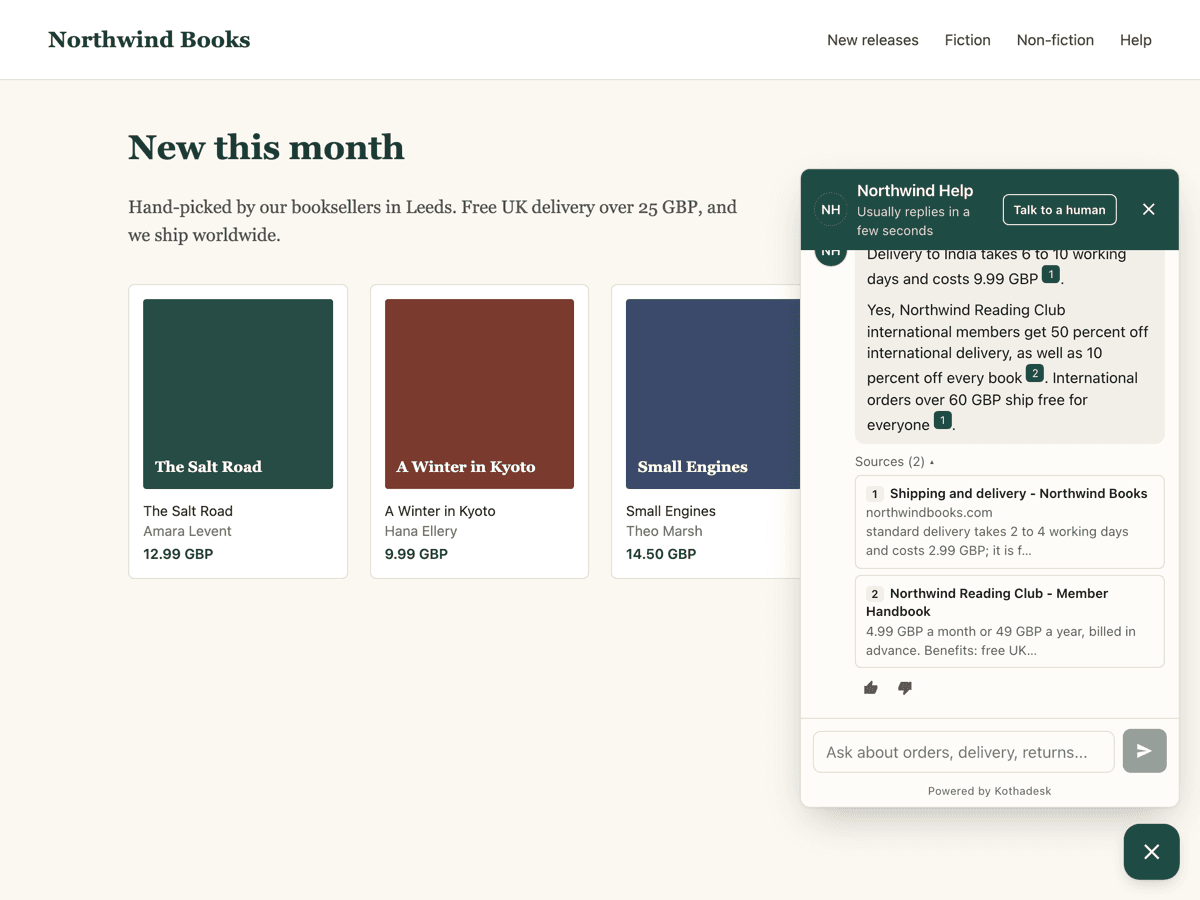
- 1One number per source, not per sentence
- 2Sources collapsed under the answer
04
Images in answers.
When a picture helps, the chatbot shows it inside the answer, right after the sentence it illustrates, with its caption and a link to where it came from.
- Where images come from
- Pictures in your web pages, PDFs and Word files, Markdown images in text and FAQ answers, and photos you upload.
- Decoration left out
- Icons, logos, SVGs, tracking pixels, tiny images and pictures repeated on many pages are skipped automatically.
- You set the limits
- Turn extraction and display on or off per bot, and allow one to three images per answer. Hide any single image.
- Described on your key
- Images without alt text or a caption can be described by the bot's own vision-capable model, so search can find them.
05
What happens when it does not know.
- Visitor
What's your refund window for gift cards?
- Assistant
Our refund policy covers orders, but I don't see anything about gift cards. Would you like me to ask someone from the team?
06
Keeping knowledge fresh.
Your site changes; the chatbot should follow without a full rebuild every time.
- Scheduled re-crawls
- Re-crawl a website manually, every day or every week. Unchanged content is not embedded again, so re-syncs cost almost nothing.
- Removed pages retire safely
- A page that disappears stays in use until two full crawls in a row miss it, or it returns 404.
- Delete what is wrong
- Delete one document or a whole source, and its passages and images go with it.
- Fill the gaps you find
- Unanswered questions show what to write next; an FAQ entry is the fastest fix for an exact price or timing.
07
Controls you will actually use.
- Citation display
- Inline numbers with a source list, the list only, or off, per bot.
- Retrieval test
- Type a question and see which passages match, their scores and the bot's thresholds.
- Re-sync and delete
- Re-crawl a source on demand; delete one document or a whole source and its passages go with it.
- Knowledge scope
- A short summary of what the bot knows, written for you after ingestion and editable, so it can say what it covers.
08
Test answers with evaluation sets.
An evaluation set is a list of real questions with the documents that answer them. Run it before and after a change, and the scores tell you whether answers got better.
- 01
Build the set
Add questions from real conversations, generate cases from your sources, or import JSONL. - 02
Run it
Kothadesk measures whether the right documents were found and whether the answer is faithful to them. The judge runs on your own key. - 03
Compare two runs
Change a model, a threshold or your content, run again and compare the results side by side.
09
Citations in your own interface.
Building your own chat UI? The JavaScript SDK streams citation events alongside the text.
import { ChatClient } from "@kothadesk/sdk-js";

const client = new ChatClient({
  botId: "bot_01J9ZKQ3M4X8R2T6V0B1C5D7EF",
  apiUrl: "https://api.kothadesk.com",
});

const conversation = await client.createConversation();
const stream = client.sendMessage(conversation.id, "Can I change my plan mid-month?");

for await (const ev of stream) {
  if (ev.type === "token") render(stream.text());
  if (ev.type === "citation") addSource(ev.citation);
  if (ev.type === "message.end") render(ev.content);
}
10
Questions about knowledge.
Which file types can I upload?
PDF, Word (DOCX), Markdown, plain text, CSV and HTML, up to 25 MB each. Scanned PDFs without a text layer are not read yet. FAQ tables can also be imported from CSV.
Can one source be shared by several bots?
Not yet. Each knowledge source belongs to one bot, which keeps answers scoped to what that bot is for.
Can I hide citation numbers?
Yes. Per bot you can show inline numbers with a source list, the source list only, or no citations.
12
Related guides.
Step-by-step setup, with worked examples by business.
Point it at your help centre and ask it something.
Start on the free plan with your own AI key. No card needed.