Answer the routine. Hand over the rest, warm.
An AI customer service chatbot that hands over to your team
Your help centre already holds the answers to most customer service questions. Kothadesk's AI chatbot gives them out, with sources, at any hour, and passes the conversations that need judgement to your agents on live chat with everything they need to pick up.
01
What changes for your team.
Before
- The same ten questions arrive every morning and wait in the queue.
- An agent opens a chat with no idea what the customer already tried.
- Screenshots arrive by email, calls need a phone number, context gets lost.
With Kothadesk
- Routine questions get a cited answer in seconds, in the customer's language.
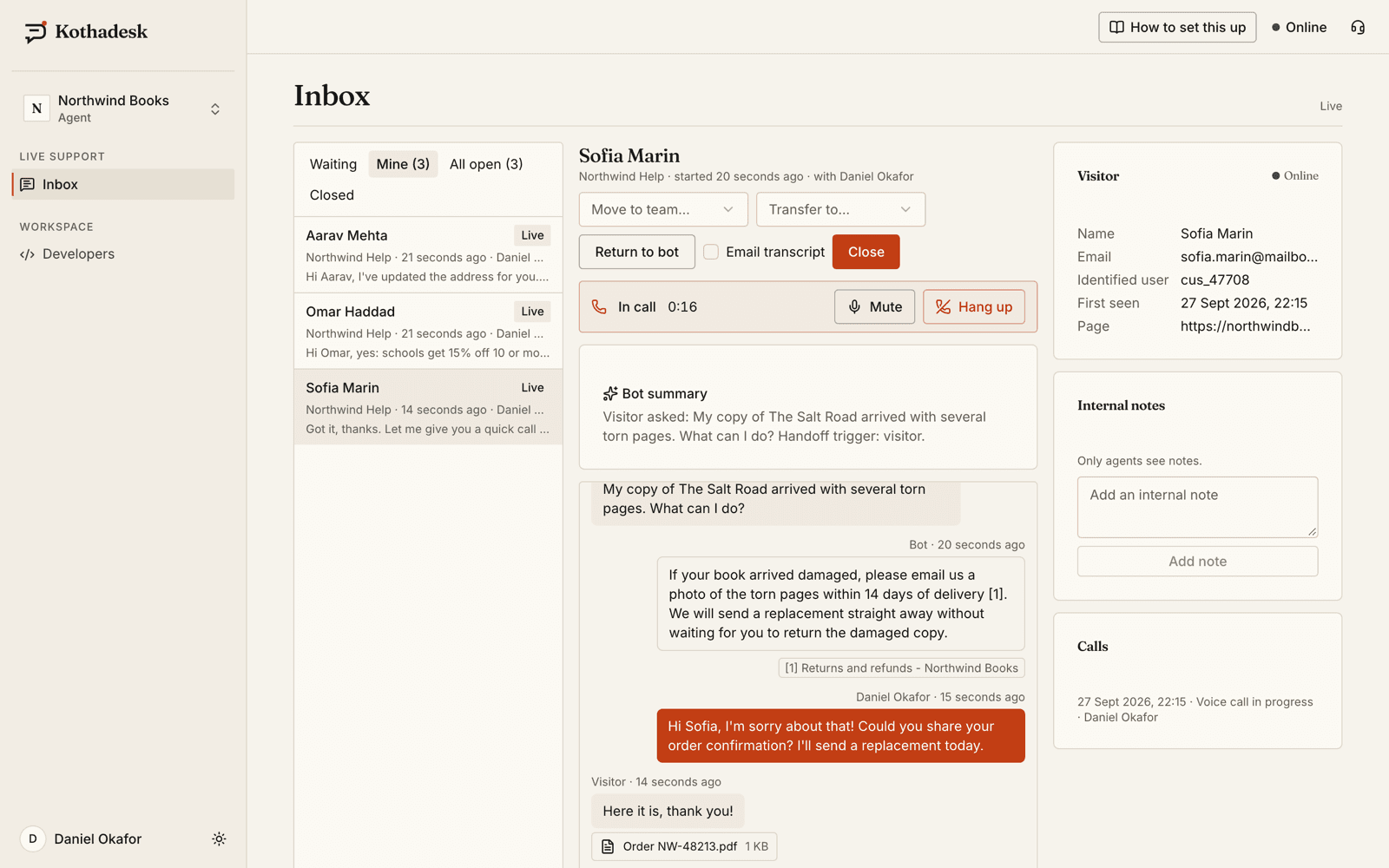
- The agent sees the transcript, a summary and the sources the assistant used.
- Files and an audio call happen inside the same chat, on the same record.
02
What the customer service chatbot automates.
The questions that arrive every day and already have a written answer somewhere in your content.
- Policy questions
- Delivery times, returns, refund windows, warranty terms, opening hours and fees, answered from the page that states them.
- How-to questions
- Changing an address, resetting a password, booking an appointment, step by step from your help centre, with screenshots where your articles have them.
- Account lookups
- With tools connected to your API, order status or free appointment slots for the signed-in customer. Changes ask the customer to confirm first.
- Questions in other languages
- The chatbot replies in the language and script the customer wrote in, from knowledge written in English.
03
What does the work.
- Grounded answers
- Only from your help centre, files and FAQ entries, with numbered sources.
- Routing to teams
- By language, topic, cited article or customer plan, with overflow when a queue waits.
- Voice when typing is not enough
- An agent calls from the inbox; the customer accepts in the chat. Not recorded.
- Know what to write next
- Unanswered questions and thumbs-down feedback show you the gaps in your docs.
04
What you can measure.
No invented deflection rate: the numbers come from your own conversations, and you can read every one of them.
| Signal | Where you see it | What it tells you |
|---|---|---|
| Unanswered questions | Conversations filter | What to add to your knowledge |
| Thumbs up and down | Conversations filter | Which answers customers trusted |
| Handoffs and waits | Inbox and team board | How much reaches your agents, and how fast |
| Ratings after live chat | Each live conversation | How your agents are doing |
| Guardrail flags | Their own list | Promises and attempts that were stopped |
| Tokens and estimated cost | Usage page | What your AI provider will bill, per bot |
| Evaluation scores | Evaluation runs | Whether a change made answers better |
05
Guardrails for promises and refunds.
A customer service chatbot must never promise what your policy does not. Kothadesk checks commitments before the customer sees them.
- Commitments checked against sources
- An answer that mentions a refund, price, date or guarantee must match your cited content, with the same numbers. Otherwise it is replaced with a safe reply.
- Your level of caution
- Allow promises your content states, or tell the chatbot to make no promises at all and point customers to your team.
- Blocked topics
- Topics you never want discussed get a polite fixed decline in the customer's language, with no model call.
- Refusals that offer a person
- Optionally, a refused request offers a handoff to your team instead of a dead end.
06
Worked example: an online store.
- Visitor
I need to change the delivery address on my order.
- Assistant
You can change the address until the order is marked as packed, from Orders > Edit delivery.source 1
- Visitor
It already says packed.
- Assistant
Once an order is packed the address can't be changed online. Would you like me to connect you with the team?source 2
- Visitor
Yes.
- Connected to the Orders team
- Kabir, support
Hi, I have your conversation here. Send me the new address and I'll check with the warehouse.
Sources
- 1Help centre: Changing your delivery address
- 2Help centre: Order statuses
07
The handoff workflow.
The chatbot never hands over on its own because a question is hard. The customer decides, and your rules decide who picks it up.
- 01
The customer asks for a person
With the button or in their own words, or by accepting an offer after unanswered questions, a thumbs-down or one of your keywords. - 02
Your rules pick the team
By language, topic, cited article, keywords or the signed-in customer's plan; the first matching rule wins. - 03
An agent picks up with context
Transcript, a short summary, the sources the chatbot used and who the customer is. On eligible plans, AI assist drafts the first reply. - 04
Close, or hand back
The agent closes the chat with a rating request and an optional transcript email, or returns it to the chatbot.
08
Worked example: a clinic.
A small clinic with a brochure, a timetable and one receptionist.
- Visitor
Is the dentist available on Saturday?
- Assistant
Yes, the dental OPD runs on Saturdays from 10 am to 2 pm.source 1
- Visitor
My tooth hurts a lot, which medicine should I take?
- Assistant
I can't advise on medicines. Would you like me to connect you with the clinic team to book the earliest slot?
Sources
- 1OPD timetable
- 2Clinic brochure
09
Set up in an afternoon.
- 01
Add your AI key
Any of the five supported provider types. - 02
Crawl your help centre
Paste its URL or sitemap; it indexes in the background. - 03
Create teams and invite agents
Set business hours and routing rules. - 04
Paste the script tag
Or share the hosted chat page if you have no site.
10
Questions from customer support leads.
Will customers get stuck talking to a bot?
No. A visitor can ask for a person at any time, and repeated unanswered questions trigger an offer to bring one in.
Can we keep our current help desk?
Yes for knowledge: crawl your existing help centre. For handoff, the built-in inbox is available today; connectors to external help desks are planned and not yet available.
Can the chatbot promise refunds or discounts?
Only when your content says so. Answers that mention refunds, prices, dates or guarantees are checked against the cited text, and a promise your sources do not support is replaced before the customer sees it. You can also tell the chatbot to make no promises at all.
What can we measure?
Unanswered questions, thumbs-up and thumbs-down feedback, chats handed to a person, guardrail flags, ratings after live chats, and token usage with an estimated provider cost per bot and model. Evaluation sets score answer quality before you change a setting.
What happens outside business hours?
Each team can have its own hours. When nobody is online the chatbot keeps answering from your sources, and a customer who wants a person leaves a message and an email address. It becomes a ticket in the inbox and your agents are emailed.
Which languages can customers write in?
The chatbot replies in the language and script of the customer's latest message, as far as your AI model writes that language. The widget's buttons and notices are available in ten languages, and fixed safety replies in 30.
Is there a free plan?
Yes. Start with one chatbot on the free plan, with your own AI key. Paid plans add volume, more team members and live support features such as agent teams; see the pricing page for what each plan includes.
11
Related guides.
Step-by-step setup, with worked examples by business.
Give your agents the conversations that need them.
Start on the free plan with your own AI key. No card needed.