Start with the assistant. Finish with a person.
Live chat with AI answers and human handoff
The AI chatbot answers first, from your own content. When a visitor needs a human, Kothadesk routes the live chat to the right team and the agent picks up with the whole conversation in front of them, with AI assist on eligible plans. Files and a browser voice call are part of the same chat, not another tool.
01
When the chatbot hands off to a person.
The assistant never hands over on its own because a question is hard. It hands over when the visitor asks, or accepts an offer.
- The visitor asks
- With the button in the widget, or in their own words, in any language.
- Repeated unanswered questions
- After a streak of questions your sources do not cover, the assistant offers a person.
- Negative feedback
- A thumbs-down can trigger the same offer, so a frustrated visitor is not left alone.
- Your keywords
- Words you choose, such as a complaint or a legal term, prompt an offer to talk to the team.
02
Rules, teams, agents.
Rules match on language, intent, the source that was cited, keywords and attributes of a signed-in user. The first match wins; otherwise the default team takes it.
03
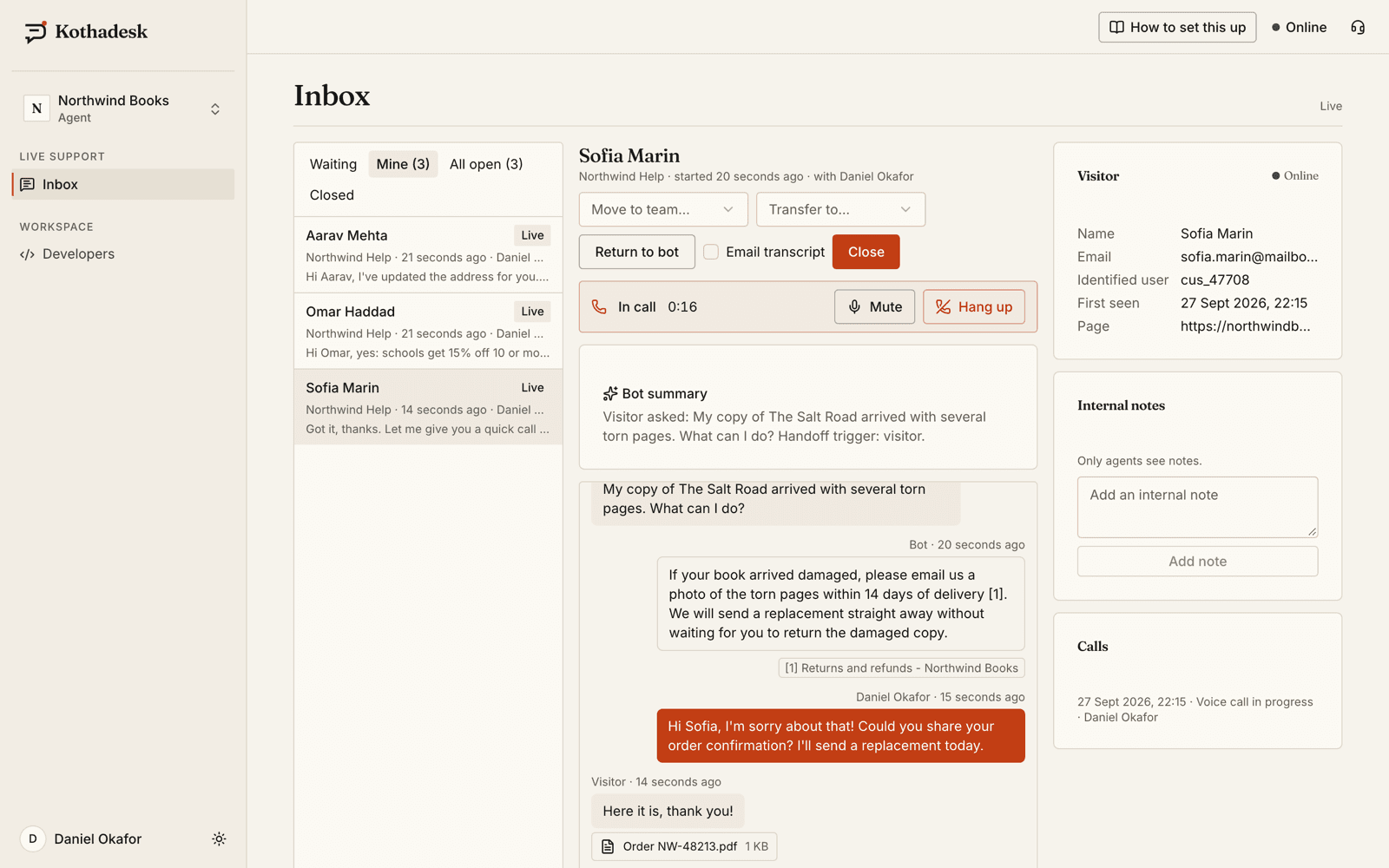
What the agent sees.
- The whole story
- Transcript, a short summary of the bot conversation, the citations it used and who the visitor is, if signed in.
- Transfer
- To another agent, or to another team's queue, with the context intact.
- Notes and canned responses
- Internal notes the visitor never sees, and saved replies for the questions that repeat.
- Close with a rating
- Visitors rate the chat on close and can receive the transcript by email.
04
AI assist for agents.
A private AI helper in the inbox, on eligible plans. It uses the bot's knowledge, guardrails and your own AI key, and nothing it writes reaches the visitor until the agent sends it.
- 01
Suggest reply
A drafted reply from your knowledge, in the visitor's language and script, with the sources it used. Edit it, regenerate it or discard it. - 02
Suggest a reply to one message
Hover any visitor message, even an older one, and ask for a draft that answers just that message. - 03
Ask AI
A private question, such as the refund window for signed copies, answered from your knowledge with numbered sources. - 04
Translate
Read a visitor's message in English, or translate your own draft into the visitor's language before you send it.
Drafts pass the same guardrails as the chatbot: a promise your knowledge does not support is flagged for the agent to check. Replies sent from a draft are marked AI-assisted in the conversation.
05
An inbox for busy agents.
Built for the hour when every queue is full, with the longest-waiting visitor always at the top.
- Waits by urgency
- Waiting chats sorted by how long the visitor has waited, amber after two minutes and red after five.
- Who is asking
- Name or email, language, the page they are on, previous conversations and what the bot remembers about signed-in users.
- Keyboard first
- Move between chats, reply, close and insert canned responses without the mouse; search by name, email or words from the chat.
- Nobody waits unseen
- Desktop notifications and sound, a team board of waiting and live chats, and optional emails when a chat waits unclaimed.
06
Files, both ways.
Screenshots, invoices and forms travel while a person handles the chat and on the offline form. The model never receives them.
| Setting | Range | Default |
|---|---|---|
| Attachments | On or off per bot | Off |
| File types | Images, PDF, DOCX, XLSX, text | All five |
| Size per file | 1 to 25 MB | 10 MB |
| Files per message | 1 to 10 | 5 |
Every file is checked by its content, not its name. Images are decoded and re-encoded, which drops location data and other metadata; documents with macros are refused.
07
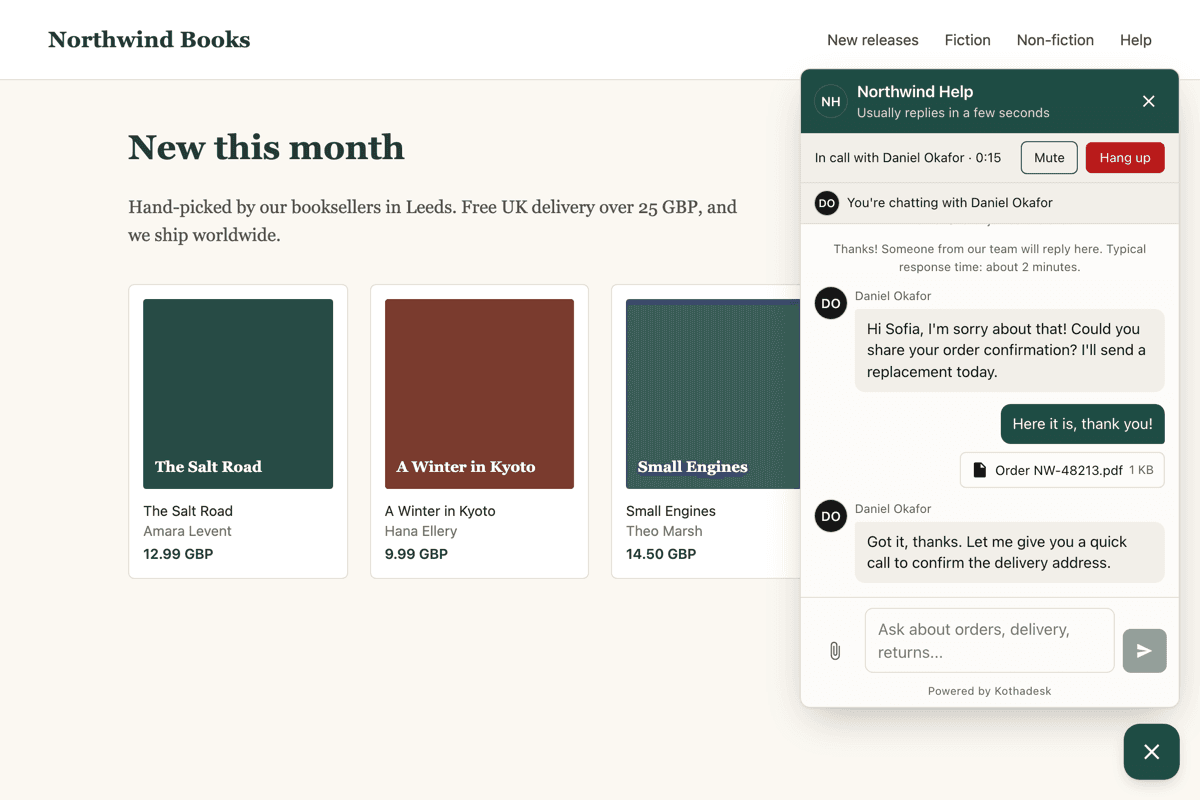
Voice calls, without a phone number.
On eligible plans, the agent places an audio call from the inbox and the visitor accepts in the chat. The call runs browser to browser and is not recorded.
| How it works | |
|---|---|
| Who calls | An agent, on a chat assigned to them |
| Media | Audio only |
| Ringing | 15 to 60 seconds, you choose |
| Longest call | 1 to 120 minutes, you choose |
| Recording | None, and no transcription |
| Transcript | One line with the outcome and duration |
| Mobile apps | With the Flutter voice add-on |
08
Offline messages outside business hours.
- Visitor
Can I talk to someone about my invoice?
- Assistant
Our team is offline right now. Leave a message and your email, and we'll reply as soon as we're back.
- Message sent to the Billing team
Each team can have its own hours. With nobody online, the visitor leaves a message and an email address; it becomes a ticket in the inbox and the team's agents are emailed.
09
Questions about live chat.
Are voice calls recorded?
No. Calls are neither recorded nor transcribed. The transcript keeps one line with the outcome and duration, such as a completed call of three minutes.
Does the visitor need a phone number or an app?
No. Calls run in the browser (or in your app with the Flutter voice add-on). The agent places the call and the visitor accepts it in the chat.
Does the assistant see the files people send?
No. Files are exchanged only while a person handles the chat or through the offline form. The model never receives them.
Which plans include voice calls and AI assist?
Both are plan capabilities, available on eligible plans. The pricing page shows which plans include them; on other plans the switches are shown but cannot be turned on.
Can agents work only in the inbox?
Yes. The agent role can use the inbox without access to bot settings, keys or billing.
11
Related guides.
Step-by-step setup, with worked examples by business.
Keep people in the loop, in the same window.
Start on the free plan with your own AI key. No card needed.